The part of using an AI coding agent that started bothering me wasn’t writing prompts. It was choosing the model.
- 🧠 Pick the strongest model: it does everything, from planning to fixing a typo—but at a high cost. Most use cases don’t need the best model, so expensive tokens go to waste on routine work.
- 💸 Pick a cheaper model: it saves money, but underperforms on high-complexity tasks, and we waste tokens getting sub-optimal output.
I wanted a different arrangement:
- 🔬 Choose a model with sufficient quality for the task at hand. Optimize for both cost and output quality, with quality as the primary driver.
- Pick the execution model once for the full implementation in a session, rather than choosing again on every turn.
So I built smartLLMrouter, a plugin for OpenCode.
🧭 The idea: plan once, route the build
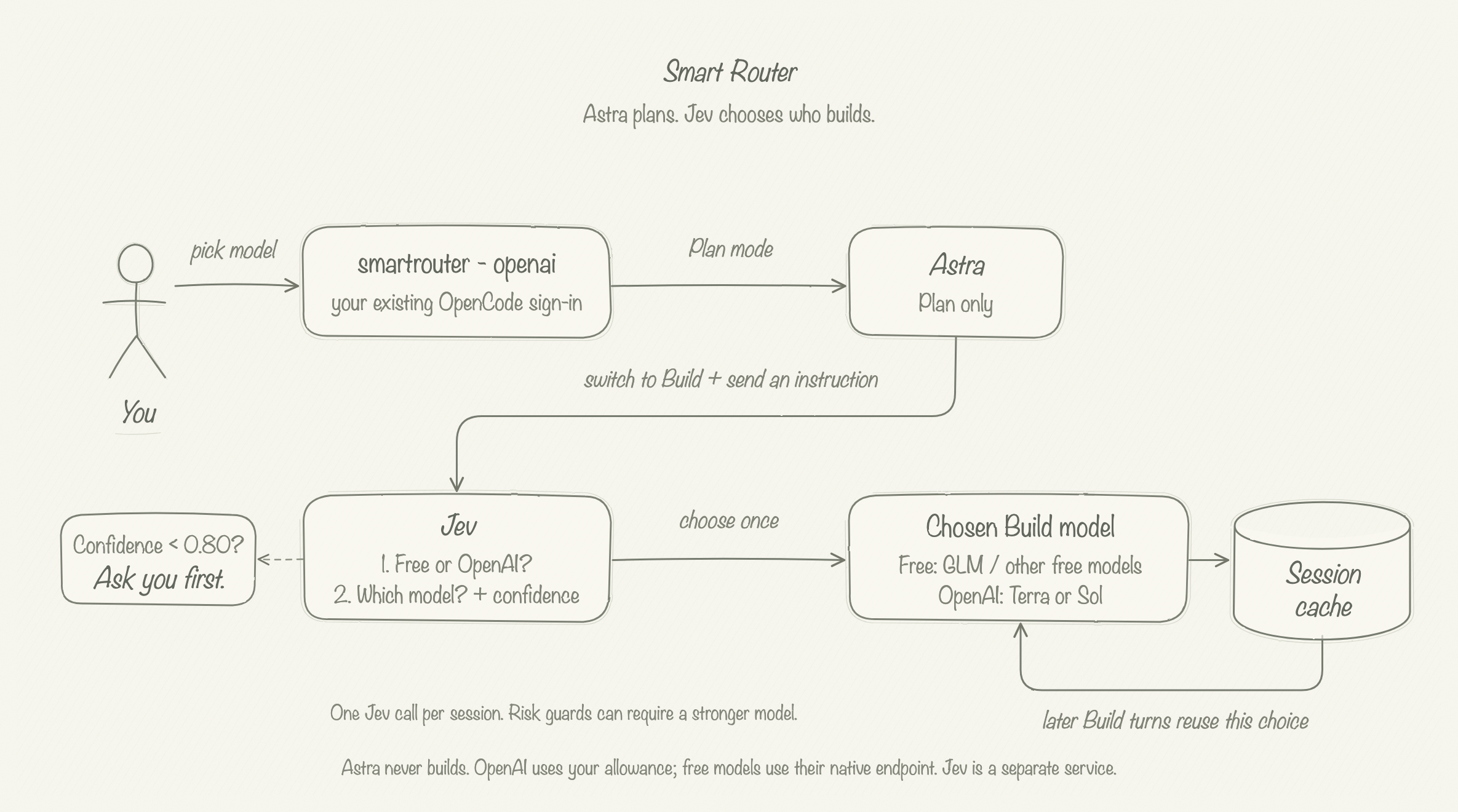
The entry in the model picker is smartrouter - openai. The OpenAI suffix identifies the planning family, not a restriction that every build must use OpenAI.
- 🧠 Plan with Astra, through my existing OpenAI sign-in in OpenCode.
- 🎯 Classify with Jev: switch to Build and send an instruction. Jev reads the finished plan and the build request.
- 🛠️ Choose the executor: Jev classifies which model fits the conversation context — a free model or a paid, high-thinking model (OpenAI Terra/Sol).
- ✋ Ask before proceeding if Jev’s probability for the output is below 0.8.
- 💾 Cache the choice for the session and reuse it for later Build turns.
Astra is only used for planning. We use lower cost models for building, based on the classification from Jev.
🎬 See it working
This is a live recording of the implementation in play.
- ▶️ At the start: Smart Router is selected in Plan, and Astra prepares a stock-dashboard plan.
- ⏱️ Around 22 seconds: the first Build instruction triggers routing, and OpenCode reports the switch to GLM Free.
- 🤝 After the handoff: the picker shows GLM Free and the session contains a Jev decision notice.
🖼️ What the routed model built
And this is the resulting stock-dashboard UI after letting the router choose GLM Free for the build.
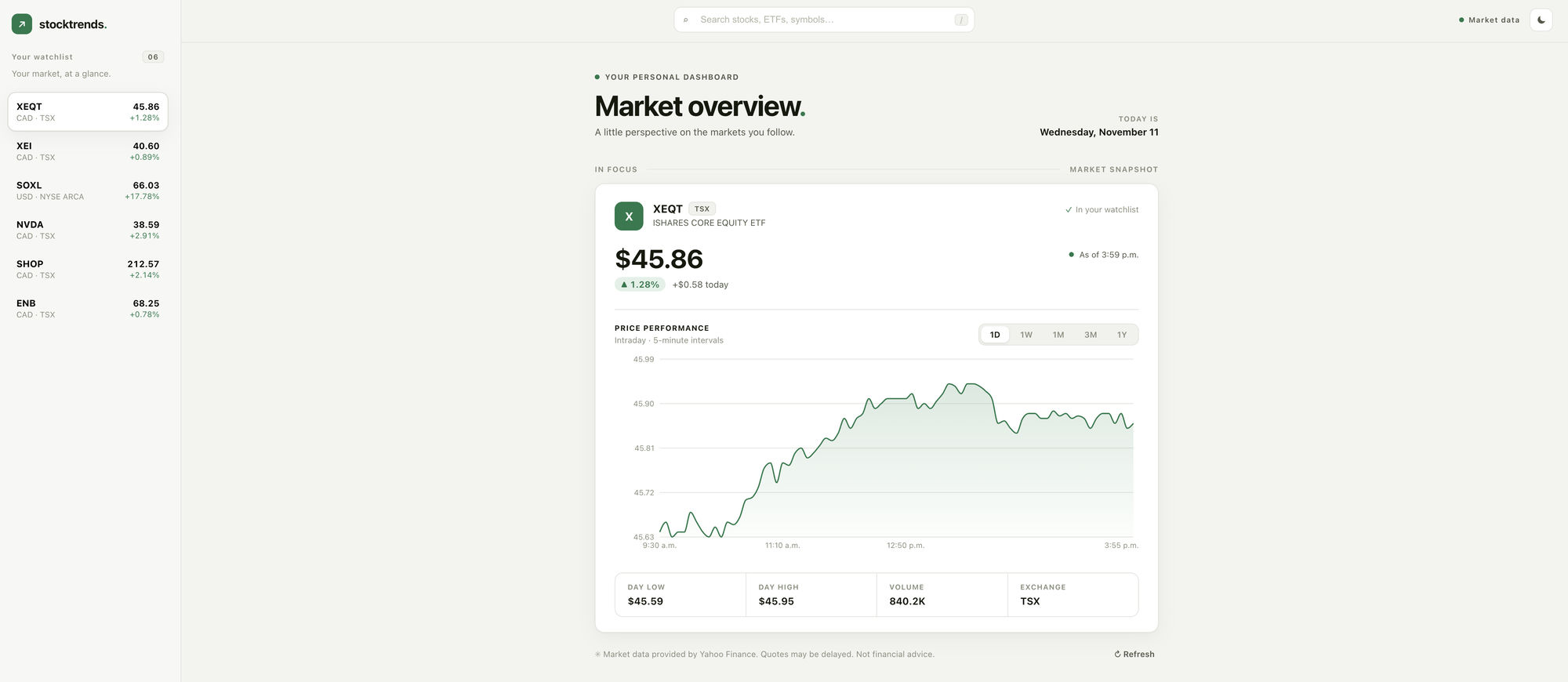
For a prototype built with a free model, I think this is really decent. The requirements were stable, and the free model delivered a good result.
🎯 Why Jev for classification?
Choosing from a fixed set of models is a classification problem, not another open-ended coding task. Jev is built for structured decisions, so I don’t need a second conversational LLM to deliberate about the route.
- One request chooses the execution family and model, while assessing infrastructure and security risks.
- Structured answers and confidence values make the choice visible and let the plugin ask for approval when uncertain.
- A cached decision keeps classification out of the repeated Build loop.
💰 What did the free build save?
Across 25 completed GLM Build requests, these were the recorded tokens and their equivalent cost at Sol’s Standard API rates:
| Token category | Recorded tokens | Sol Standard API rate / million | Same-usage Sol estimate |
|---|---|---|---|
| Uncached input | 34,658 | $2.00 | $0.0693 |
| Cached input reads | 444,992 | $0.10 | $0.0445 |
| Output + reasoning | 18,420 | $10.00 | $0.1842 |
| Build total | 498,070 | $0.2980 ≈ $0.30 |
💰 At Sol’s API pricing, the same token usage and cache split would cost about $0.30. With the router, the GLM build cost $0 because it routed to a free model.
The saving is small here because the requirements were simple. For larger projects spanning multiple conversations, those avoided build costs can stack up whenever a free model is sufficient.
🚀 Try it
The code and setup instructions are in smartLLMrouter on GitHub.
To use native routing, you need:
- OpenCode with the plugin loaded.
- An existing OpenAI OAuth sign-in.
- A Jev credential for classification.